< uses VIRPIL VPC MongoosT-50CM3 Throttle

VIRPIL VPC MongoosT-50CM3 Throttle

10/10 owned actively-used updated 2026-09-27

Dual-axis HOTAS throttle with contactless sensors, swappable detents and 30+ inputs, I don't even use them all

Maker VIRPIL Controls
Model VPC MongoosT-50CM3 Throttle
Type HOTAS throttle

Store

Store Price Checked
VIRPIL EU €279.95 2026-09-21

Description

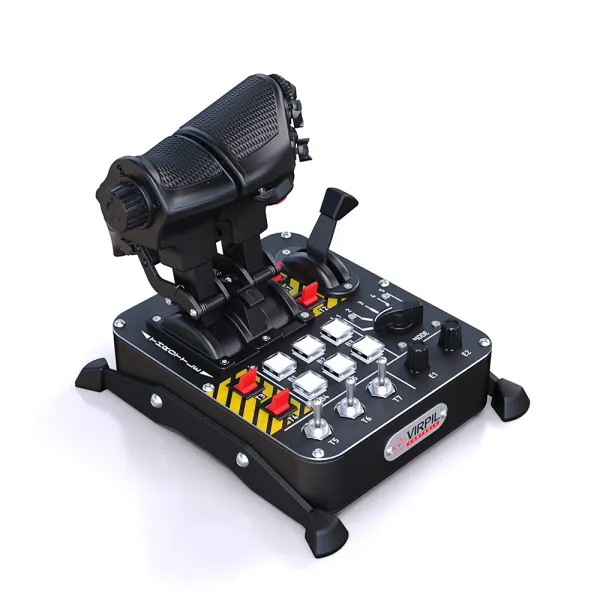
This is the throttle half of my HOTAS, VIRPIL's mid-size throttle with two rotating throttle handles on contactless sensors that can run independently or latched together (never used them independently), plus an auxiliary axis on the base and a slider and analogue ministick on the handles.

The base panel has six RGB-backlit buttons, seven toggle switches, two push encoders and a 5-way mode dial that multiplies the button functions, which puts it well over 30 inputs (I don't even use them all). It's quite sturdy, and expensive.

I bought it together with the Constellation, already on the base with the buttons, so on top of the buttons on the throttle you also get the ones on the base. My old throttle was very good and I liked it a lot, but besides having a gigantic base it had nothing special, it was just a throttle, and I never brought it over here.

Impressions

I've never had a throttle this full of stuff. It has so many buttons that I don't use more than half of them in practically any game. That's also why, together with the Constellation, I can play games that aren't flight sims, I play Euro Truck Simulator 2 with them for example. With that many buttons you can have a good experience in pretty much any game, as long as you're comfortable controlling things with a stick and a throttle.

I've never played a game that needed the two handles separately. It's one throttle with two levers, so in a flight simulator you can control two engines at the same time, and it's well made for that. There's a detent in the middle, which is really nice, I mostly use it because it's handy to know where the middle is. You can split the two levers and use them separately too. Elite Dangerous doesn't have anything like that, but I imagine other flight sims do.

What I don't like much is the same software problem I mentioned on the Constellation, except it's even worse here, because the throttle has a lot more buttons and more settings. You can configure the colour of the LEDs on the panel, for example, and figuring out how to do that was hell, there are so many buttons and so many things to configure that it gets really tedious.

The toggle switches go up and down as momentary on in both directions. I'd rather they were on/off.

Related