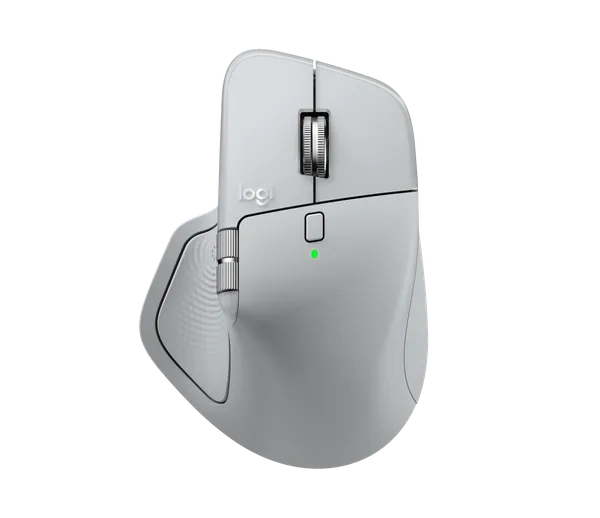
Logitech MX Master 4
Flagship mouse from Logi, I am ambidextrous with mouses but I really needed something with side scrolls and this was the best option.
| Maker | Logitech |
|---|---|
| Model | MX Master 4 (MR0118) |
| Type | Wireless productivity mouse (Darkfield 8000 DPI, haptic thumb panel, 150 g) |
Store
| Store | Price | Checked |
|---|---|---|
| Logitech SE | 1 499 kr | 2026-09-21 |
Specs
| Spec | Value |
|---|---|
| Buttons | 8 (left, right, wheel, back, forward, top, gesture, haptic sense panel) |
| Connectivity | Logi Bolt USB receiver (CU0028) and Bluetooth Low Energy, up to 3 devices |
| Weight | 150 g |
Description
I'm left-handed but ambidextrous with mice, and I really needed something with a side scroll, so this was the best option. It replaced the Lift as my main mouse.
I bought it recently, after visiting a friend in Madrid who had one of these, with the Mac version that has everything adapted for macOS. I thought it was fantastic. Back when I worked at Klarna you could choose between the Magic Mouse and the MX Master 3, and I ended up choosing the Magic Mouse, because the MX only comes right-handed. If you read my note on the Lift you'll see what my problems with right-handed mice are, but I can use one normally. So I took the chance at my friend's place and tested it for a while.
The main reason I bought it is that I was, and still am, using it for CAD and for music production. It charges over USB-C and lasts up to 70 days on a charge, its Bolt receiver is USB-C too, and it pairs with three devices over Bluetooth. The thumb button opens the Actions Ring, which is the haptic shortcut overlay, and there's a separate gesture button. All of it is configured through Logi Options+.
Impressions
What I liked most about it is the button on the side that you can program.
It's very good for two things, mostly for music editing. I use Logic Pro for editing and music production, and Logic, like any other music production software, has a timeline that scrolls sideways. Unless you really want to hold Shift or Ctrl the whole time to scroll horizontally, the only way to use it satisfactorily is either having the Magic Mouse on a Mac, where you can scroll directly, or having a mouse with a built-in horizontal scroll, and there are very few of those. The MX was one of them. So I bought this mouse mostly for music production, and it ended up working in any other software that has a canvas on screen, where I can use both vertical and horizontal scroll.
It also has the two side buttons, forward and back, and an extra button I think is very cool, one you can hold while making a gesture. I use it for a bunch of things, so I hold it and drag up for Mission Control, or hold it and push back to change page, or change space on the Mac. It has a lot of nice features, honestly more buttons than I need.
To configure the action button you have to download Logi Options+, and that software is terrible, so I configured it and then use it very rarely. It does have a series of integrations with a series of programs, and I mostly use Spotify and the other media controls straight from the mouse, since I listen to music all day.
The battery lasts forever. I've had it for over a year and I've never had to charge it. It has the USB dongle, but it connects to three devices over Bluetooth, so I've never used the dongle. One of the nicest bits of UX I've seen on any mouse is that the dongle goes into the charging port, since both of them are USB-C, so I just leave it stuck there and that's that. The bad part is that when you do have to charge it, which has never happened to me, you have to get the dongle out somehow.
Final thoughts
It's a sensational mouse. If you're natively right-handed everything about it is probably better, but it's a very good mouse and I recommend it. It's just a bit expensive.